
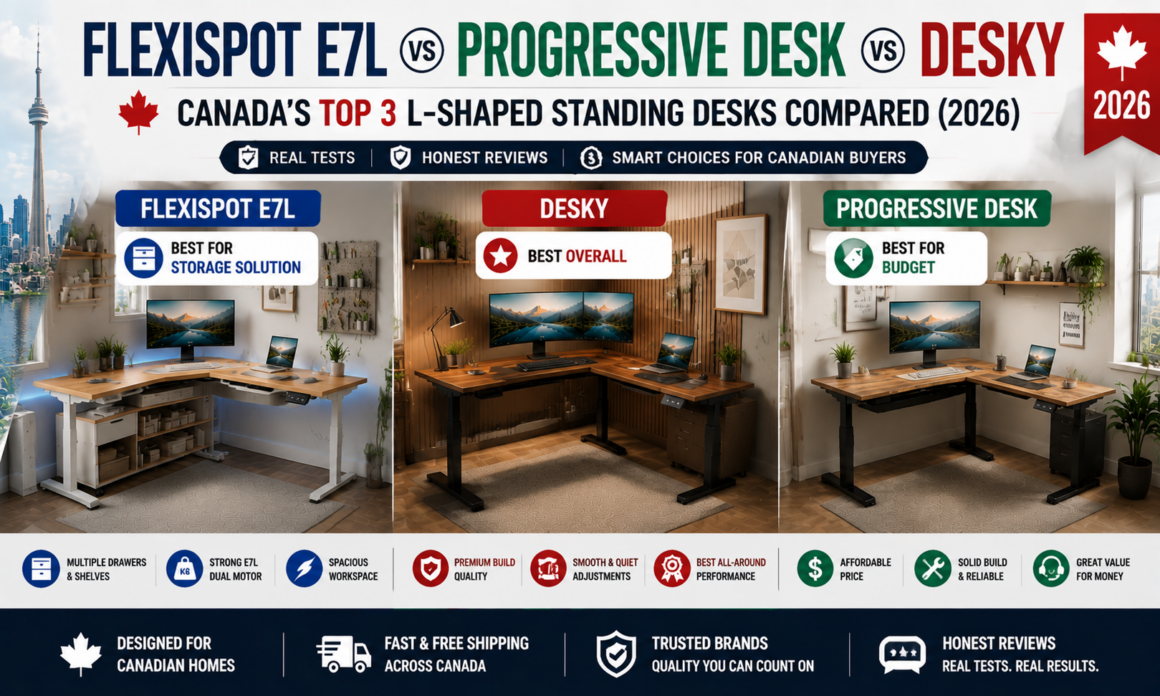
- Best Overall: Desky L-Shape Laminate Sit Stand Desk – highest weight capacity of the three at 440.9 lb, with cable management built into the frame.
- Best for Storage Solution: FlexiSpot E7L – widest drawer and shelf accessory lineup, stocked across multiple major retailers.
- Best for Budget: Progressive Desk Corner Ryzer – lowest starting price of the three at $877.60 CAD on sale.
- Evaluation criteria: weight capacity, cable management, warranty length, starting price, and accessory availability.
Desky’s L-Shape Laminate Sit Stand Desk earns the best overall verdict in this three-way comparison. Its triple-motor frame lifts up to 440.9 lb while routing cables through a channel built into the frame itself.
FlexiSpot’s E7L answers a different question well: it pairs with the widest lineup of drawer and shelf add-ons of the three, sold through FlexiSpot’s own site plus Amazon, Dell, and Office Depot. Progressive Desk’s Corner Ryzer solves a third problem, landing under $900 CAD on sale, the lowest entry price of the group.
Spec sheets flood corner-desk shoppers with numbers that all start to sound the same. This breakdown separates what each desk actually does well from what it merely claims to do, for the roughly 20% of Canadians who now work most of their hours from home [1], including remote workers, gamers, and hybrid professionals setting up a home office in 2026.
No affiliate links here and no commissions either. This comparison was researched and written independently, with no payment tied to any product mentioned.
Table of Contents
ToggleThe Three L-Shaped Desks, Compared
|
Spec |
FlexiSpot E7L |
Desky L-Shape Laminate Sit Stand Desk |
Progressive Desk Corner Ryzer (Compact) |
|
Award |
Best for Storage Solution |
Best Overall |
Best for Budget |
|
Price |
~$640-855 USD frame + desktop |
From $1,399 CAD |
From $877.60 CAD (sale) |
|
Motors |
Triple |
Triple |
Triple |
|
Weight Capacity |
330 lb |
440.9 lb |
330 lb |
|
Warranty |
15 years |
10 years |
15 years |
FlexiSpot E7L Pro L-Shaped Standing Desk – Best for Storage Solution
FlexiSpot’s E7L handles the storage problem most standing desks ignore. The desk ships without built-in drawers, but it’s designed around FlexiSpot’s own accessory catalogue: lockable under-desk drawers, a slim slide-out drawer, and clamp-mounted storage shelves. FlexiSpot sells those add-ons through its own site, and Amazon, Dell, and Office Depot stock them separately.
The frame runs on three motors rated to 330 lb, with a reversible panel that lets either leg extend, so one SKU works for both corner orientations. Pricing runs from roughly $640 to $855 USD depending on retailer and desktop configuration, and the bamboo or chipboard desktop options ship at 1 inch thick.
The motors carry a 15-year warranty, and the keypad includes anti-collision detection along with programmable height presets.
Pros:
- Widest third-party accessory ecosystem of the three, with drawers and shelves sold across multiple retailers
- Reversible 3-leg frame works for left-hand or right-hand corner layouts without a different SKU
- 15-year warranty on the frame, matching Progressive Desk’s coverage
- Anti-collision detection and programmable height presets on the keypad
Cons:
- No built-in storage; drawers and shelves are separate purchases
- Canadian pricing isn’t listed as a static number on its website, so buyers need to check the cart for current CAD totals
- Lower weight capacity than Desky’s L-shape at 330 lb versus 440.9 lb
Best for: Buyers who want to build a fully organized corner setup with drawers, shelves, and cable trays from one accessory catalogue.
Contact:
Address: 10 Newkirk Ct, Brampton, ON L6Z 0J9, Canada
Phone: +1 (855) 585-5618
Facebook: facebook.com/FlexispotCA/
Desky L-Shape Laminate Sit Stand Desk – Best Overall
Desky’s L-Shape Laminate Sit Stand Desk runs on three electric motors that lift both surfaces together up to 440.9 lb, the highest capacity of the three desks here, at under 40 decibels of noise. Cable management is built into the frame through an Integrated Cable & Power Channel rather than sold as an accessory, and an optional powered add-on routes up to nine devices down to a single cord.
Desky certifies the frame to the ANSI/BIFMA X5.5 desk standard [2], plus UL, CSA, and TÜV Rheinland testing, and backs it with a 10-year warranty on the frame, motors, and electronics. App and Siri control layer on top, adding four saved height presets and sit/stand reminders that neither FlexiSpot nor Progressive Desk offers on their L-shaped models.
The laminate desktop ships in eight finishes, from White and Black to Natural Walnut, Classic Oak, and Sublime Teak, with the frame available in Matte Black, White, Space Grey, or Grey. That desktop surface carries its own separate 5-year warranty, plus FSC, PEFC, and Global GreenTag sustainability certification distinct from the frame’s coverage above.
Pros:
- Highest weight capacity of the three at 440.9 lb, run by three motors instead of two
- Cable management is built into the frame, not an add-on purchase
- App and Siri voice control with saved height presets and sit/stand reminders
- 10-year warranty plus BIFMA, UL, CSA, and TÜV Rheinland certification
Cons:
- Highest starting price of the three at $1,399 CAD
- Smart features require pairing with a smartphone app during setup
Best for: Hybrid professionals and multi-monitor users who want the highest load capacity and built-in cable routing without buying separate accessories.
Contact:
Address: 1270 Humber Place, Ottawa, ON, Canada
Phone: +1 800-657-5042
Instagram: instagram.com/deskyau
Progressive Desk Corner Ryzer – Best for Budget
Progressive Desk undercuts both competitors on entry price without cutting the motor count. The Corner Ryzer Compact starts at $877.60 CAD on sale (regular price $1,096.97), still triple-motor and rated to 330 lb, matching FlexiSpot’s E7L.
Height runs from 23.6 to 49.1 inches across four memory presets, and the frame carries a 15-year warranty, matching FlexiSpot’s coverage and beating Desky’s by five years.
The company runs its own Canadian site and warehouse in Richmond, BC, and processes orders within 24 hours on weekdays. The Compact tier uses an MDF desktop only; Standard and Spacious tiers add solid wood options at a higher price.
Pros:
- Lowest starting price of the three, even before the current sale discount
- 15-year warranty, five years longer than Desky’s
- Canadian-based operations with orders shipped from a BC warehouse
- Under-desk drawer and cable tray accessories available, though a smaller lineup than FlexiSpot’s
Cons:
- Compact tier desktop is MDF only; solid wood requires stepping up to a pricier size tier
- No app or voice control, unlike Desky’s smart features
- No built-in cable channel; cable management is a separate accessory purchase
Best for: Budget-conscious buyers who still want a triple-motor frame and a long warranty without paying for smart features they won’t use.
Contact:
Address: 160-6691 Elmbridge Way, Richmond, BC, Canada
Phone: 1-800-828-9414
Facebook: facebook.com/ProgressiveDeskCA
Before You Compare Prices: Plan Your Workspace First
Specs only matter once they fit the room. These six checks decide which of the three desks above actually works in your space before price becomes the deciding factor.
A. Measuring a Canadian Home Office
Most Canadian condos and starter homes allocate a corner nook rather than a dedicated office, so measure the actual wall-to-wall corner distance before comparing desktop sizes. Desky’s L-Shape Laminate Sit Stand Desk spans up to 70.9 x 68.9 inches at its largest, while Progressive Desk’s Compact tier starts as small as 60 x 48 inches, a better fit for tighter rooms.
B. Left-Hand vs Right-Hand Corner Layouts
Not every corner opens the same direction, and not every desk adapts to both. FlexiSpot’s E7L uses a reversible panel that flips for either a left-hand or right-hand return without changing SKUs, a detail worth checking on any corner desk before ordering since most L-shaped frames are built for one orientation only.
C. Choosing the Right Desktop Size
Oversized desktops swallow small rooms fast, even when the spec sheet looks impressive. Match the desktop to actual equipment: a single monitor and laptop fit comfortably on any of the three compact options, while dual-monitor and multi-device setups benefit from Desky’s or Progressive Desk’s larger Standard and Spacious tiers.
D. Ceiling Height and Standing Comfort
Height range determines who can actually stand comfortably at the desk. Canadian workplace ergonomics guidance recommends setting the desktop level with your standing elbow height, not eye level [3], so taller users over 6’2″ should confirm the maximum extension clears that mark before buying. All three options here top out between 49 and 50.8 inches, enough for most adults.
E. Floor Type and Desk Stability
Hardwood and tile floors transmit more vibration than carpet, so frame weight matters more on hard flooring. Desky’s 440.9 lb triple-motor frame and Progressive Desk’s steel legs both hold steady under multi-monitor loads, while FlexiSpot’s accessory-loaded setups benefit from its anti-collision sensors during height changes.
F. Planning Around Windows and Natural Light
A desk facing a window all day fights glare on monitors. Matte or darker frame finishes, available across all three brands, cut reflection better than white or light frames, and positioning the desk perpendicular to a window usually beats facing it directly.
FAQs
How much weight can an L-shaped standing desk hold?
Weight capacity varies by desk: FlexiSpot’s E7L and Progressive Desk’s Corner Ryzer both hold up to 330 lb, while Desky’s L-Shape Laminate Sit Stand Desk holds up to 440.9 lb thanks to its triple-motor frame. Multi-monitor setups with docking stations and accessories add up faster than most buyers expect, so check actual equipment weight against these numbers before ordering.
Do L-shaped standing desks fit in small Canadian home offices?
Yes, if the desktop size matches the room. Progressive Desk’s Compact tier starts at 60 x 48 inches, small enough for a condo corner, while Desky and FlexiSpot both offer smaller configurations before scaling up to their largest sizes.
What’s the real difference between FlexiSpot, Progressive Desk, and Desky?
FlexiSpot leads on accessory storage and retail availability, Progressive Desk leads on starting price and warranty length, and Desky leads on weight capacity and built-in cable management. None of the three wins in every category, which is why the right pick depends on which trade-off matters most.
Is it worth paying more for Desky over a budget L-shaped desk?
Whether Desky is worth the extra cost depends on what the buyer actually needs from the desk. Desky’s 440.9 lb capacity and integrated cable channel justify the higher price for multi-monitor or heavy-equipment setups, but a single-monitor home office may not need the extra headroom that Progressive Desk or FlexiSpot already provides at a lower cost.
The Bottom Line
Desky’s L-Shape Laminate Sit Stand Desk stands out as the best overall pick among these three, offering the highest weight capacity, built-in cable management, and smart controls that neither competitor matches. FlexiSpot’s E7L and Progressive Desk’s Corner Ryzer both have real strengths of their own, whether that’s FlexiSpot’s accessory ecosystem for storage-heavy setups or Progressive Desk’s lower entry price for budget-conscious buyers.
Measure the corner, match the desktop to the equipment going on it, and pick the desk that solves the specific problem in front of you rather than the one with the longest spec sheet. All three ship to Canadian addresses and hold up under daily use, so the deciding factor comes down to fit, not brand.
References:
-
Statistics Canada. (2024). The Daily: Working from home in Canada. https://www150.statcan.gc.ca/n1/daily-quotidien/240118/dq240118c-eng.htm
-
BIFMA. (2026). Standards Overview. https://www.bifma.org/page/standardsoverview
-
Canadian Centre for Occupational Health and Safety. (2025). Office Ergonomics: Sit/Stand Desk. https://www.ccohs.ca/oshanswers/ergonomics/office/sit_stand_desk.html